Deeplink Binding and Payment
Deeplink redirection lets a merchant send users from the merchant app (or web page) into the DANA App using a redirect URL provided by DANA. After the merchant opens the URL, DANA detects whether the DANA App is installed:
- If the app is installed, the user is redirected into the DANA App to continue the flow.
- If the app is not installed, the user is redirected to the DANA Web page as a fallback.
Where it's used:
- Binding: the merchant opens the binding URL returned by Deeplink Binding .
- Payment: the merchant opens
webRedirectUrlreturned by the Direct Debit Payment - Non Binding API . To enable redirect to app for payment, the merchant must setadditionalInfo.supportDeepLinkCheckoutUrltotrue.
- Redirect Binding to DANA App
- Redirect Payment to DANA App
Overview
The DANA Widget Binding flow lets users link their DANA account inside a merchant app. Merchants can initiate binding via Seamless Binding by providing seamlessData, or continue with Normal Binding without seamlessData. In both cases, the user is redirected to the DANA App as the primary binding experience to complete the binding process.
Flow
The general flow of DANA Widget Binding is as follows:

→ Scroll horizontally to see the complete diagram.
- User starts the DANA account binding process within the merchant App.
- Merchant calls Deeplink Binding generator to initiate the account binding process.
- Check if the merchant provided seamless data.
- If seamlessData is provided, the flow continues with Seamless Binding. The user must complete binding using the same phone number as the one provided in
seamlessData. - If seamlessData is not provided, the flow continues with Normal Binding. The user can proceed in the DANA App as long as they are already logged in.
- DANA generates and returns the binding URL.
- Merchant opens the generated URL.
- Check if the DANA App is installed
- Detect the app and automatically launches the DANA App for binding process.
- Detect the app is missing and automatically falls back to the DANA Web page. The web page will open either in container in merchant’s side or open in the browser page.
- User completes the DANA account binding process.
- After the binding process is completed, DANA redirects the user to the merchant’s redirectUrl and provides authCode.
Demo Video
Sample (1) | Sample (2) |
What should merchant do?
- In the Deeplink Binding request, use seamlessData when you already have the user’s phone number. When seamlessData is provided, the user must continue binding with the same phone number as the one provided in seamlessData. If the logged in DANA account uses a different phone number, the user will be logged out and must log in again with the matching account. If seamlessData is not provided, the flow will continue as Normal Binding. The user can still continue binding from the DANA App as long as they are already logged in.
- Able to open DANA redirect URLs (universal links) to enable handoff to the DANA App.
- Prefer opening the redirect URL via the OS/native browser. If the merchant uses an in-app WebView with domain allowlisting, the merchant must whitelist or allowlist the following domains:
https://link.dana.id,https://m.dana.id,https://danaid.link, anddanaid://.
Overview
The DANA Widget Non-Binding flow enables users to pay with DANA within merchant apps. Currently, users complete payments on the DANA Web View page. Starting 31 July 2026, we will gradually roll out an update that redirects users to the DANA App as the primary payment experience. Newly integrating merchants should enable deeplink redirection from the beginning so users are directed to the DANA App.
| Scenario | Before 31 July 2026 | After 31 July 2026 |
|---|---|---|
| User has DANA App installed | Deeplink redirection is optional
| Deeplink redirection is mandatory
|
| User does not have DANA App installed | Redirect to DANA Web View page | Redirect to DANA Web View page |
Redirection to the DANA App depends on whether deeplink redirection is enabled. The date indicates when merchants are expected to enable this configuration. See What should merchant do? for the exact parameter to set.
Before 31 July 2026
The general flow of DANA Widget Non Binding before 31 July 2026 is as follows:
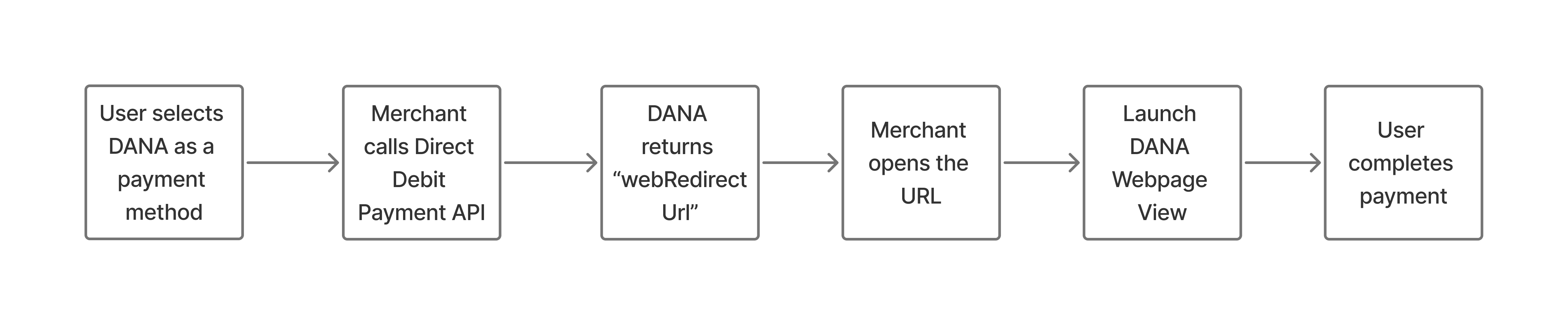
- User creates an order and selects DANA as the payment method within the merchant App.
- Merchant makes a Direct Debit Payment - Non Binding API call to DANA to initiate the payment transaction.
- DANA returns a response containing ‘webRedirectUrl’.
- Merchants opens the ‘webRedirectUrl‘.
- Launches the DANA Web Payment page for payment.
- User completes the payment process and the transaction is finalized.
After 31 July 2026
The general flow of DANA Widget Non Binding after 31 July 2026 is as follows:
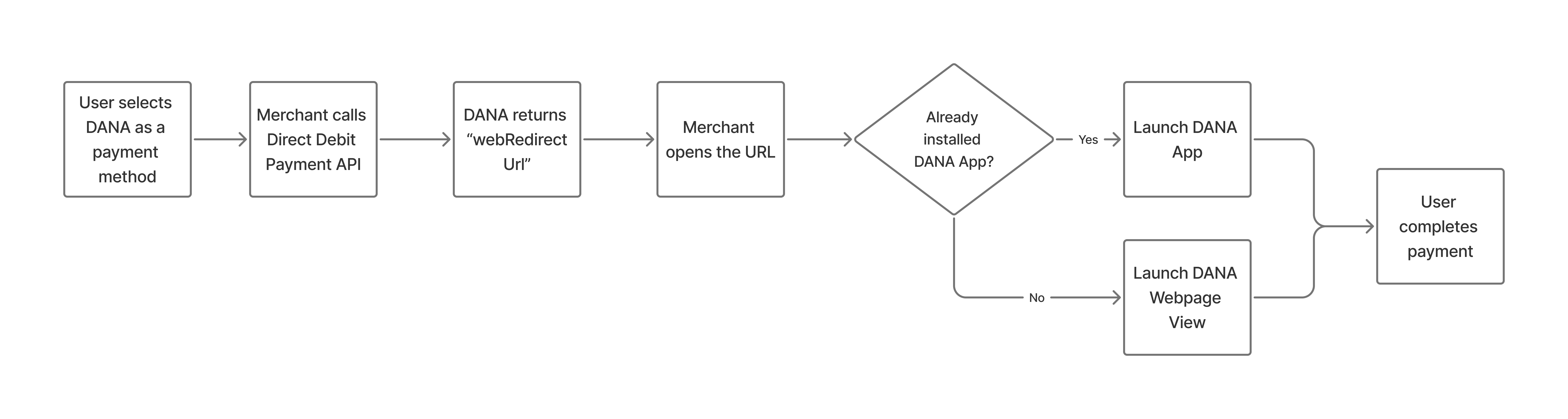
- User creates an order and selects DANA as the payment method within the merchant App.
- Merchant makes a Direct Debit Payment - Non Binding API call to DANA to initiate the payment transaction, setting additionalInfo.supportDeepLinkCheckoutUrl as a Mandatory and value always to
true - DANA returns a response containing ‘webRedirectUrl’.
- Merchants opens the “webRedirectUrl”.
- Check if the DANA App is installed.
- Detect the app and automatically launches the DANA App for payment.
- Detect the app is missing and automatically falls back to the DANA Web Payment page. The web page will open either in container in merchant’s side or open in the browser page.
- User completes the payment process and the transaction is finalized.
Demo Video
Redirect Payment to DANA App
What should merchant do?
- In the Direct Debit Payment - Non Binding API , set supportDeepLinkCheckoutUrl as a mandatory field and always set its value to
true. - Able to open DANA redirect URLs (universal links) to enable handoff to the DANA App.
- Prefer opening the redirect URL via the OS/native browser. If the merchant uses an in-app WebView with domain allowlisting, the merchant must whitelist or allowlist the following domains:
https://link.dana.id,https://m.dana.id,https://danaid.link, anddanaid://.
Common Issue #1: Webview in Merchant Front-end
Some users may not be redirected to the DANA App when the payment page is opened inside the merchant’s in-app WebView. This usually happens because the WebView tries to load the redirect URL as a normal web page instead of passing it to open the target app.
Successful Sample | Failed Sample |
- Android Native
- React Native
- Flutter
The WebView intercepts every navigation event. If the URL matches DANA deeplink/universal link patterns (or is a non-HTTP URI), the app opens it using an Android Intent and returns “handled” so the WebView does not load it.
What should merchant do?
- Implement both
shouldOverrideUrlLoadingvariants (new and deprecated) so interception works across Android versions. - Detect DANA redirect URLs using these identifiers:
danaid://https://link.dana.idhttps://m.dana.idhttps://danaid.link
- Treat URLs that are not standard HTTP(S) as external-app URIs (your sample uses
!url.contains("http")). - Open external-app URIs via
Intent(Intent.ACTION_VIEW, uri)and returntrueto block WebView navigation. - Allow normal URLs to load in WebView by returning
false. - If your WebView uses domain allowlisting, ensure these domains remain allowlisted:
link.dana.id,m.dana.id,danaid.link.
@TargetApi(Build.VERSION_CODES.N)
override fun shouldOverrideUrlLoading(view: WebView, request: WebResourceRequest): Boolean {
    return handleWebviewCustomUri(request.url)
}

@Suppress("OverridingDeprecatedMember", "DEPRECATION")
override fun shouldOverrideUrlLoading(view: WebView, url: String): Boolean {
    return handleWebviewCustomUri(Uri.parse(url))
}

private fun handleWebviewCustomUri(uri: Uri): Boolean {
    val url = uri.toString()

    val deepLinkIdentifiers = listOf(
        "danaid://",
        "https://link.dana.id",
        "https://m.dana.id",
        "https://danaid.link"
    )

    // Check if the URL contains any of the known deep link identifiers, or if it lacks "http"
    val isExternalAppUri = deepLinkIdentifiers.any { url.contains(it) } || !url.contains("http")

    return if (isExternalAppUri) {
        val intent = Intent(Intent.ACTION_VIEW, uri)
        startActivity(intent)
        true
    } else {
        false
    }
}
The react-native-webview intercepts navigation through onShouldStartLoadWithRequest. If the URL is a DANA deeplink/universal link (or Android intent://), the app opens it via Linking.openURL and returns false so WebView does not navigate to it.
What should merchant do?
- In
onShouldStartLoadWithRequest, block WebView navigation and open via OS for URLs starting with:danaid://https://link.dana.idhttps://m.dana.idhttps://danaid.linkintent://(Android)
- Return
falsefor those URLs to prevent WebView from loading them. - If your WebView enforces allowlisting, ensure
link.dana.id,m.dana.id, anddanaid.linkremain allowlisted.
<WebView
  ...
  onShouldStartLoadWithRequest={function (req) {
      if (
        req.url.startsWith('danaid://') ||
        req.url.startsWith('https://link.dana.id') ||
        req.url.startsWith('https://m.dana.id') ||
        req.url.startsWith('https://danaid.link') ||
        req.url.startsWith('intent://')
      ) {
          Linking.openURL(req.url);
          return false;
      }
    }}
  ...
/>
The WebView listens for URL changes. When a navigation matches DANA deeplink/universal link patterns, the WebView stops loading and hands the URL to the OS using url_launcher. This prevents the WebView from trying to load the deeplink itself.
What should merchant do?
- Listen to URL changes (as in the sample).
- If the URL starts with:
https://link.dana.iddanaid://https://m.dana.idhttps://danaid.linkthen stop WebView navigation (stopLoading, optionallygoBack) and open via OS (canLaunch→launch).
- If your WebView enforces allowlisting, ensure
link.dana.id,m.dana.id, anddanaid.linkremain allowlisted.
 // Source - https://stackoverflow.com/a/60515494
 // Posted by Alex Nazarov
 // Retrieved 2026-03-11, License - CC BY-SA 4.0

 _subscription = webViewPlugin.onUrlChanged.listen((String url) async {
     print("navigating to deeplink...$url");
     if (
       url.startsWith("https://link.dana.id") ||
       url.startsWith("danaid://") ||
       url.startsWith("https://m.dana.id") ||
       url.startsWith("https://danaid.link")
     )
     {
       await webViewPlugin.stopLoading();
       await webViewPlugin.goBack();
       if (await canLaunch(url))
       {
         await launch(url);
         return;
       }
       print("couldn't launch deeplink $url");
     }
   });
Common Issue #2: Web-based Redirect Implementation
Deeplinks work best when triggered by user clicks on <a href="..."> elements across domains. JavaScript-based redirection, such as window.open or window.location.href, can also be used. However, if any issues occur, it is recommended to use redirection triggered directly by a user action, such as clicking a link.
