Subscription
Subscription is a recurring payment that a user authorizes to be charged on a schedule. To execute each scheduled charge, the subscription uses an amount model, which defines how the charge amount is determined for each subscription billing cycle. This solution supports two amount models:
-
Subscription with Dynamic Amount: The amount may vary for each billing cycle. The merchant specifies the amount for each charge based on the subscription schedule.
-
Subscription with Static Amount: The amount is fixed for each billing cycle. DANA automatically deducts the amount according to the subscription schedule.
Subscription with Dynamic Amount
An automatic scheduled payment with a merchant who sets amounts each cycle
Subscription with Static Amount
An automatic payment on an agreed schedule, where DANA deducts the user’s amount each cycle
| Available APIs for Subscription with Dynamic Amount Solution | |
|---|---|
| Apply OTT POST | Used to get one time token that will be used as authorization parameter upon redirecting to DANA |
| Create Subscription First Payment POST | Used to initiate a new subscription |
| Query Subscription Transaction POST | Used to obtain information of payment/transaction regarding subscription |
| Query Subscription by Id POST | Used to obtain information of subscription based on subscription identifier |
| Query All Subscription POST | Used to obtain information of subscription |
| Subscription Reminder Scheduled Payment POST | Used to reminder merchant about schedule of subscription |
| Create Subscription Scheduled Payment POST | Used to create a schedule payment with dynamic amount |
| Finish Notify POST | Used to notify payment status and information from DANA to merchant’s platform |
| Remove Subscription POST | Used to remove the user’s subscription |
| Remove Subscription Notify POST | Used to notify remove subscription status and information |
| Test Scheduler POST | Used to manually trigger subscription scheduler (only use in offline environment) |
Process Flow
The following are the process flow for this scenario:
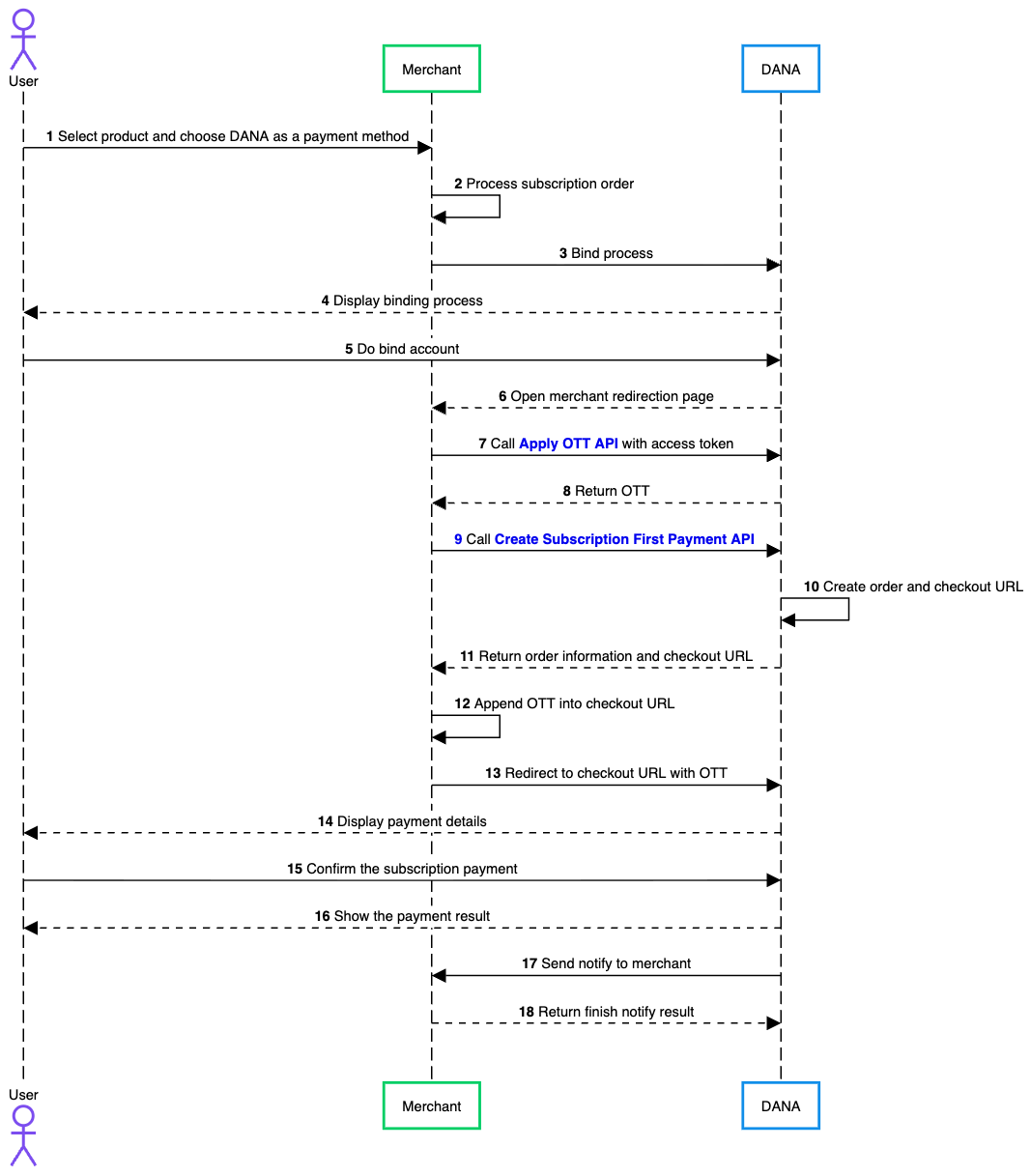
- User selects a product or service that supports subscription and chooses DANA as payment method during checkout on merchant’s platform.
- Merchant processes subscription order internally by validating product, creating subscription order record, and preparing transaction details that will be sent to DANA.
- Merchant initiates account binding process by informing DANA that user needs to bind their DANA account so merchant can perform subscription payments.
- DANA displays binding interface to user, which explains that user will authorize merchant to charge their DANA account automatically for future subscription payments.
- User completes binding process by logging in to their DANA account, entering required credentials, and providing consent to allow merchant to access their account for subscription billing.
- Once binding process is completed successfully and merchant obtains an access token from DANA, DANA redirects user back to merchant’s redirection page so checkout process can continue.
- Merchant calls Apply OTT API to request an OTT (One Time Token) that will be used to securely generate checkout URL for payment process.
- DANA processes request and returns OTT to merchant as response.
- Merchant calls Create Subscription First Payment API to create first subscription payment order in DANA’s system.
- After receiving this request, DANA creates payment order and generates checkout URL that will be used for user to complete payment.
- DANA returns response to merchant containing order information along with generated checkout URL.
- Merchant appends OTT received earlier into checkout URL as parameter to ensure checkout request is properly authenticated.
- Merchant redirects user to DANA checkout page using checkout URL that includes OTT.
- On DANA page, user is shown payment details of subscription, including merchant information, subscription plan, billing amount, and other relevant transaction information.
- User reviews details and confirms subscription payment by approving transaction using their DANA account authentication method.
- Once payment process is completed, DANA displays payment result to user, indicating whether payment was successful or failed.
- After transaction is processed, DANA sends notification to merchant by calling Finish Notify API, which provides transaction payment status.
- Merchant responds to this notification by returning confirmation message to DANA indicating whether payment status has been successfully received and processed by merchant.
