Virtual Account
Virtual Account (VA) is a bank transfer–based payment method that enables DANA and Bank users to complete payments for specific bills, invoices, orders, or DANA balance top-up. This solution offers two key functionalities:
- Virtual Account: Enables both DANA and Bank users to complete payments for specific bills, invoices, orders, or to top up their DANA balance by transferring funds to a designated Bank Virtual Account number.
- Virtual Account with Create VA: Enables DANA and Bank users to make payments for specific bills, invoices, orders, or top up DANA balance by transferring funds to a dynamically generated Bank Virtual Account number.
Virtual Account
Allows users to make payments or top up their DANA balance by transferring funds to a designated Bank virtual account number.
Virtual Account with Create VA
Allows users to make payments or top up DANA balance using a virtual account number that is generated for each transaction, ensuring the payment is automatically linked and confirmed.
| Available APIs for Virtual Account | |
|---|---|
| Inquiry POST | Used to inquiry Virtual Account (VA) and information from Bank to DANA |
| Payment VA POST | Used to request payment status and information from Bank to DANA |
| Inquiry Status POST | Used to inquiry status and information from DANA to Bank |
Process Flow
The general flow of Virtual Account is as follows:
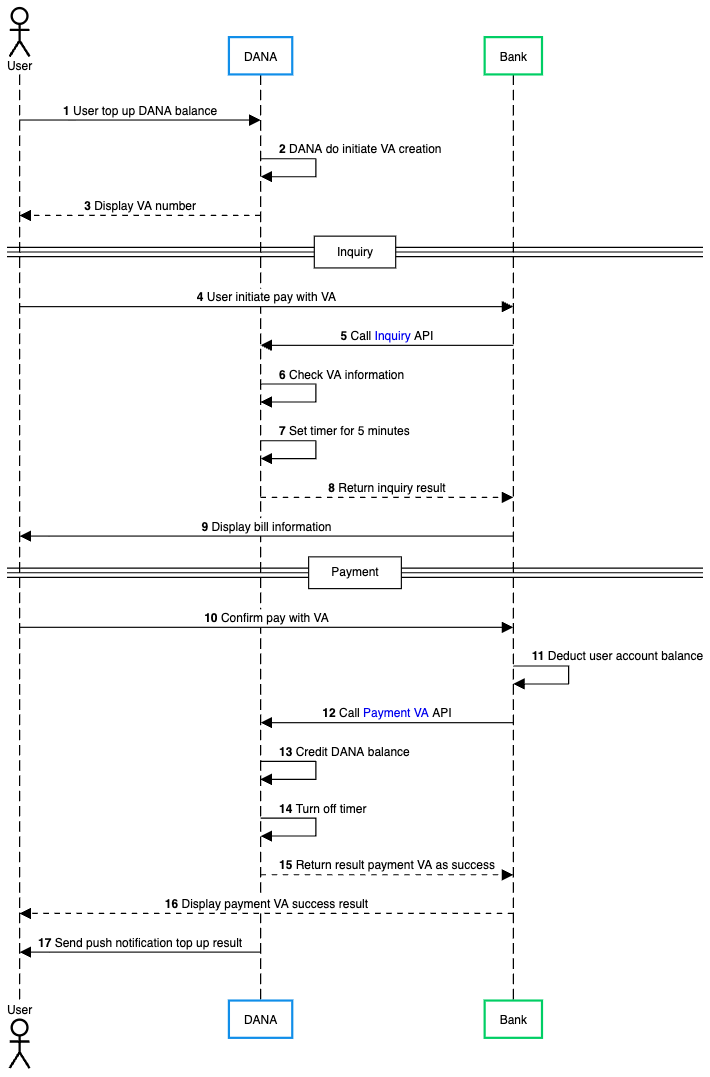
- User initiates top up to DANA balance.
- DANA processes the request and initiates the creation of a Virtual Account (VA) number for this transaction.
- DANA displays the generated VA number to the user.
- User opens their Bank application and initiates a payment using the VA number provided by DANA.
- Bank calls Inquiry API request to DANA to retrieve information about the VA and validate the transaction details.
- DANA receives the inquiry request and checks the VA information to verify the transaction is valid.
- DANA sets a timer for 5 minutes to ensure the transaction is completed within the expected time.
- DANA returns the inquiry result to the Bank, including bill information and transaction details.
- Bank displays the bill information to the user for confirmation.
- User reviews the information and confirms the payment with VA.
- Bank deducts the specified amount from the user's account balance.
- Bank calls Payment VA API request to DANA to complete the transaction.
- DANA processes the payment and credits the amount to the user's DANA balance.
- After credit user’s DANA balance, DANA turns off the timer.
- DANA returns a success response to the Bank indicating the payment was processed successfully.
- Bank displays the payment success result to the user.
- DANA sends a push notification to the user confirming the successful top up transaction.
